Human approval
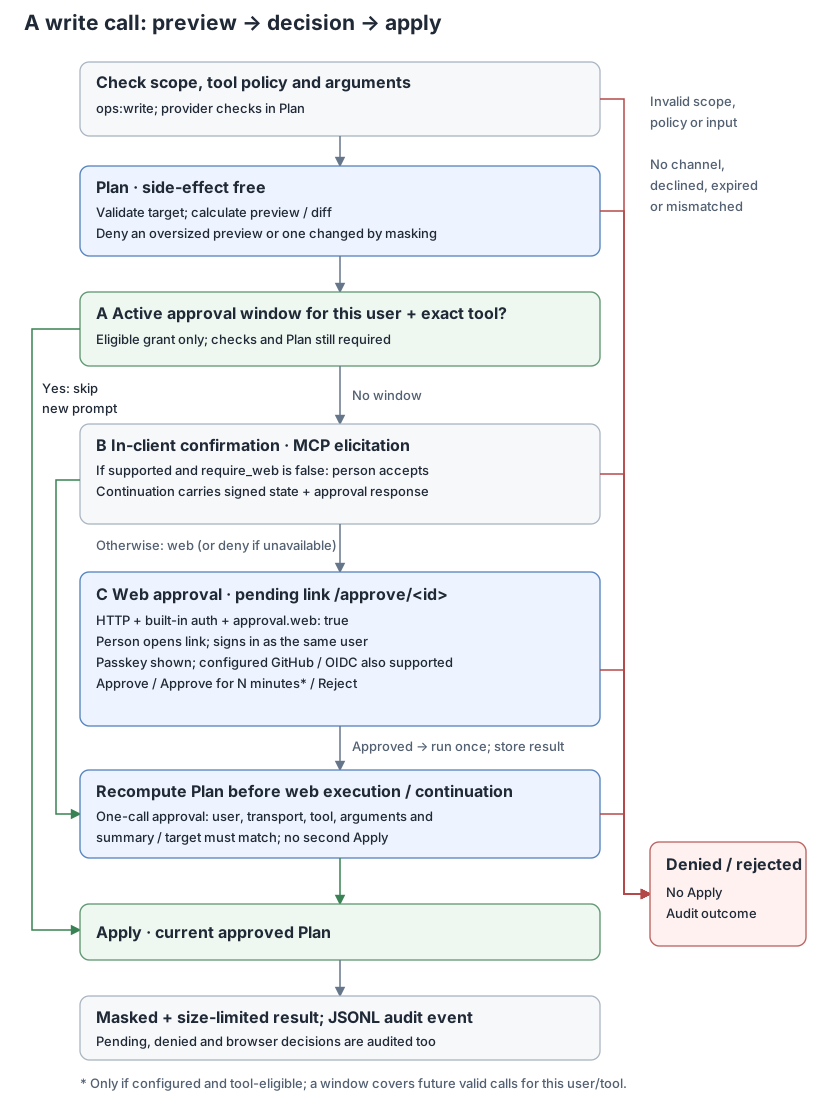
Tools registered through the write wrapper need a successful plan and human confirmation before Apply. This includes Kubernetes writes and note writes.
Execution flow
call
  -> check raw argument size and compute argument hash
  -> authenticate caller -> user tool policy -> required scope
  -> reject invalid arguments
  -> Plan: validate target/policy and calculate the change
  -> reject an oversized or masked preview
  -> confirmation: active window / client input / web link
  -> Apply the current approved Plan
  -> mask and limit result -> JSONL audit event
The raw size check and argument parsing happen before authorization, but their error is returned after caller, user tool and scope checks. The usual scope is ops:write. HTTP also requires ops:read at /mcp.
Plan is side-effect-free. Its summary must identify the target and effect. If masking changes the summary, the write is denied because the human cannot see an unambiguous preview. Web approval recomputes Plan before applying; retrieving a stored outcome does not plan or apply again. Plan and Apply have separate server.tool_timeout deadlines; the default is 30 seconds each.
Confirmation channels
The manager first validates the request and require_web restrictions, then resolves any supplied approval_id as a stored outcome. Otherwise it checks for an active approval window and processes supplied client input; a fresh HTTP request uses web approval by default when approval.web is enabled. Explicit approval.require_web: false opts in to elicitation when supported, with web approval as fallback. No available channel means denial.
Plans with truncated previews require web approval showing the complete masked arguments; without a browser channel, split the change into smaller writes. This full-review requirement is bound to signed client state and web approval records, while existing eligible approval windows continue to apply.
When full review is required, any redaction change to the arguments (excluding approval_id) denies the write before confirmation or approval-window reuse; split the change or remove the masked value.
When a server reaches several systems, such as multiple Kubernetes clusters, approval screens show the target above the summary. Targets marked protected require human approval for every call, even when the tool is eligible for a window.
Approval window
A window is an optional grant keyed by user, exact tool name and target. It covers any valid arguments for that tool on that target, across transports with the same user identity. A grant for one target never covers another target or an unnamed target. It still requires all normal authorization checks and a valid Plan with a visible summary.
approval.window is zero by default, disabling grants. If enabled, it must be between 1m and 12h, and the tool must match a path.Match glob in approval.window_tools. An empty list permits no grants. The human must explicitly choose the window option; enabling configuration alone does not grant a window.
There are at most 100 live user/tool/target grants. A new grant does not evict another live grant; renewing an existing grant is allowed.
This is a configuration fragment to merge into a working configuration:
approval:
  ttl: 10m
  window: 15m
  window_tools: [k8s_rollout_restart]
In-client elicitation
On HTTP with web approval enabled, set approval.require_web: false explicitly to opt in to elicitation. Without a web channel, including external/static auth and stdio, elicitation remains the default.
When require_web is false and the client advertises elicitation, opsgate returns MCP multi round-trip InputRequests with an opsgate_approval form. It shows the target when present, summary, requester and transport. The human must accept with approve: true. Eligible tools also offer allow_window.
The server gives the client HMAC-SHA256 signed request state containing user, transport, tool, target, per-call approval requirement, argument hash, summary hash, expiry, nonce and any offered window duration. The signing key is random for each process start.
On continuation, the server checks the signature and expiry, rejects a reused nonce, then consumes the authenticated nonce before checking bindings and the response. A bad binding or response therefore cannot reuse that state. Only approve and allow_window content keys are accepted. allow_window must be a boolean and must correspond to the offered, still-eligible window.
This opt-in lets a compromised client approve its own writes: the server cannot tell whether a human or client software answered. HTTP startup warns when elicitation is allowed. Keep web-only approval when the decision must happen in the authenticated browser.
Web approval
Web approval requires HTTP with auth.mode: builtin; approval.web defaults to true there. It uses the built-in sign-in session; it is unavailable in external/static modes and stdio.
initial call -> create approval and wait up to approval.wait
  -> if still pending, return /approve/<id> link
  -> human opens link and signs in as the requesting user
  -> Reject / Approve / Approve + allow for configured duration
  -> approval re-plans -> summary/target checked -> Apply -> audit
  -> waiting call receives result, or client reads approval_status
Approving runs the original call exactly once, including Approve + allow for a window. Execution uses the original caller's identity, scopes, tool list and arguments. It continues if the MCP request or browser disconnects, with separate server.tool_timeout deadlines for re-planning and applying. If the summary, target or review requirements changed, nothing is applied; the page and stored outcome explain why. An apply failure returns Not applied: ... and needs a new approval to try a write again.
approval.wait defaults to 25s when web approval is enabled explicitly or through a mode, otherwise 0s. It accepts 0s–55s; zero returns the pending link immediately. A waiting call returns the apply result on success, an error on apply failure, or denial on rejection. Request cancellation ends the wait without revoking the approval. Creation records a pending event; execution records exactly one apply event with approval: web. Waiting calls and result retries do not duplicate that apply event.
If the wait ends first, the normal text tool result asks the assistant to show the link and includes the expiry and approval_id. After approval, no further call is needed to execute the write. To read its outcome, call the read-only approval_status tool with {"approval_id":"<id>"} (ops:read required). Only the requester can read it; other users receive the same unknown-or-expired response as an unknown ID. It returns tool, target, status (pending, running, applied, not_applied, rejected) and result when available.
If the assistant repeats the same call (same requester, arguments and plan) while its approval is still undecided or running, the call joins that approval and waits on it instead of creating a second one. After approval the page shows Applied or Not applied with the result.
A compatibility retry of the original tool with the same arguments plus approval_id returns the stored outcome and never executes again:
{"kind":"deployment","namespace":"default","name":"web","approval_id":"<id from the pending result>"}
The page displays the plan line by line, highlights diff lines only after consecutive --- and +++ headers (shown muted), and includes masked arguments. Only the exact requesting user can view or decide it. Decisions are protected by CSRF checks and cross-origin protection, are accepted once, and use a strict script-free Content Security Policy.
Result retries must match the requester, transport, tool and canonical unredacted argument hash (excluding approval_id). The stored runner binds the approved summary, target and review requirements and checks them before applying. Reading a completed result does not compare against a new live plan: the approved change may itself have changed that plan. A retry carrying approval_id never uses an approval window to authorize another apply. Fresh calls without an ID can still use eligible windows.
Web-only decisions are the default when approval.web is enabled, which builtin auth does unless the file sets approval.web: false. This fragment makes that choice explicit in a working built-in HTTP configuration:
approval:
  ttl: 10m
  web: true
  require_web: true
require_web: true disables in-client elicitation. An explicit true also denies stdio writes through the approval wrapper. When the file omits require_web, -transport stdio keeps elicitation allowed, including with a mode-based file, because the user starts the process locally and stdio has no web channel. config show prints the HTTP default as explicit true; running that output on stdio denies writes until the key is removed or set to false. Existing eligible windows still work for HTTP calls. HTTP startup rejects require_web: true without web: true, and rejects web approval unless authentication is built-in.
Replay protection, limits and state
| Control | Behavior |
|---|---|
| Argument binding | SHA-256 of canonical unredacted JSON arguments, excluding approval_id; masked arguments are only for display/audit |
| Plan binding | Recomputed summary, target and per-call approval requirement must match; note writes also check the planned file snapshot during Apply |
| One-call use | Web decisions start one stored runner; result reads never apply; elicitation uses consumed nonces |
| Pending/input lifetime | approval.ttl, default 10m; a nonpositive TTL causes confirmation requests to be denied |
| Web record capacity | 100 live records, including running and retained outcomes; no live record is evicted |
| Outcome retention | Until at least the original expiry; executions remain readable for at least 10 minutes after finishing. Rejections remain until original expiry |
| Nonce capacity | 1,000 live consumed nonces; live entries are not evicted to accept another continuation |
| Window capacity | 100 live user/tool/target combinations |
| Persistence | Pending records, windows, consumed nonces and elicitation signing key are memory-only; restart discards all of them |
The default raw write argument limit is 16 KiB; some content-bearing tools raise it. Summary limits scale with each tool's argument limit. See Tools for limits.
Audit and operational boundaries
Tool events use pending, denied, ok or error. Browser decisions add approved or rejected events, and a recovery check adds recovered, not_recovered or unverified. Grant creation adds window_granted. The approval field identifies elicitation, web or window where applicable. Plans and display arguments are masked; full successful results are not stored as audit text.
Approval confirms a requested action, not arbitrary future actions by the same client. Windows intentionally broaden that promise to a tool on the approved target for their lifetime. OS permissions, Kubernetes RBAC, provider allowlists, scopes and tool restrictions remain necessary.
See Authentication to configure built-in sign-in and the security policy for trust boundaries.
Catalog action links
New links use GET /approve/action/{tool}?<arguments>&source=rule|ai. The server
catalog contains only k8s_rollout_restart, k8s_restore_image, k8s_scale and
k8s_delete_pod; note tools are excluded. Each action must also be registered
as Direct by the enabled provider and server tool policy. The catalog defines
English/Korean labels, exact link argument names and future undo metadata:
scale and image restore are reversible; restart and pod deletion are not.
Restart changes no data directly, but still needs approval.
Allowed arguments are cluster, namespace, name, plus kind for restart
and scale, replicas (an integer) for scale, or container, expected_image,
image for image restore. cluster may be omitted on a single-cluster server.
Unknown or repeated fields, approval_id, invalid sources and masked/secret
values are refused before an approval is created. source is display/audit
metadata, never a tool argument; it defaults to rule. The English approval
page shows the catalog label and either “Suggested by: rule” or “Suggested by:
AI — review carefully”. Source is a suggestion marker, not authenticated proof
of authorship. Pending, decision and execution audit events record source.
The read-only action_link tool defaults to source=ai, validates the current
target with Plan and returns a URL, label and summary. It needs ops:read and
the caller's tool policy, but cannot apply or grant an approval. Opening any
link still requires browser sign-in and the approver's own ops:write, tool
policy and target allowlists. Approve re-plans and runs once; links never open
approval windows. Pod deletion from links requires a controller owner, checked
again at apply with a resource-version precondition. MCP requests retain the
existing warning for pods without a controller.
Historical /approve/restart/{cluster}/{kind}/{namespace}/{name} and
/approve/restore-image/{cluster}/{namespace}/{name}?container=…&expected_image=…&image=…
remain aliases with the same catalog validation.
Approval inbox and notifications
Open /approvals in your phone or desktop's normal browser and sign in as the
user who requests changes. The inbox shows watch notices addressed to you
(when configured below) and only your live approvals, with
pending requests first, followed by decisions and execution results. Open a
request to review its plan; approving re-plans and runs it once as usual. The
inbox also works without notifications. Use it outside Telegram/Discord's
in-app browser so passkey sign-in can use the browser's normal credentials.
To receive Web Push notifications:
-
Enable push in your builtin-auth HTTP configuration (
approval.webis required):approval: web: true push: enabled: true subject: mailto:owner@example.com state_file: /var/lib/opsgate/push.json language: enUse your own contact
mailto:orhttps:URL forsubject. Mode-based files defaultstate_fileto/var/lib/opsgate/push.json; other files must set it. Keep it separate from the OAuth state file. Forward/approvalsand its subpaths through your HTTPS reverse proxy, along with the existing auth and approval routes. -
Open
/approvalson each device in a normal browser and sign in. On iPhone, choose Add to Home Screen first, then open opsgate from the Home Screen. Desktop and other supported browsers can also install the inbox. -
Click Enable notifications on this device and allow notifications. On a computer, Open on your phone shows a QR code that opens the inbox on the phone; approval and choices pages offer the same. Send a test notification pushes to every device of your account, the inbox shows how many devices have notifications on, and the server log records how many devices the push service accepted (counts only). On iPhone and iPad, notifications reach only apps added to the Home Screen; the inbox says so when opened in a Safari tab. Every opsgate page links the install manifest, so adding any of them, such as an approval or sign-in page, installs the same app, which opens the inbox. The account must have
ops:write. Up to 10 devices per user are kept; adding or renewing a subscription makes it newest and evicts the oldest if necessary. Use Disable notifications on this device to remove that device.
A new MCP web approval queues a notification to the requester's devices;
link-created requests do not notify because the person is already in the
browser. Clicking the notification opens /approvals/next, which after sign-in
redirects to the newest undecided approval, alert notice or finished
recovery check, or to the inbox when nothing is waiting.
Notifications never approve anything.
The notification text names only the kind of the newest item: an approval is
waiting, an alert needs a decision, or an action recovered, did not recover or
could not be checked (language: ko shows the Korean wording). On receiving a
push the service worker reads that kind from the signed-in GET /approvals/latest;
when it cannot, for example because the session expired, it falls back to
“An approval is waiting” or, with inbox notices, “An alert needs a decision”.
Privacy: push carries no approval content, ID, target or result. The push
service sees an empty request with VAPID contact information and timing; the
service worker builds the notification locally from /approvals/latest, which
returns only the kind of item, never its target, because notifications can show
on a lock screen. Device
subscription URLs are capabilities and are never written to logs or audit.
Subscriptions and the server-generated VAPID key pair persist atomically in a
0600 state file; preserve it across restarts. Deleting it requires devices to
unsubscribe and enable notifications again. Approval records remain memory-only.
Delivery is best effort: one worker drains a bounded 100-request queue, with short timeouts and no retries; a full queue drops the notification and logs a generic warning. An offline device may receive it before the approval expires; 404/410 responses remove that subscription. The inbox remains the source of current status. The pending MCP message does not claim delivery succeeded.
Endpoints must use HTTPS on port 443, be at most 1 KiB and match
approval.push.allowed_hosts (defaults: fcm.googleapis.com,
updates.push.services.mozilla.com, web.push.apple.com,
*.notify.windows.com). Wildcards match subdomains only. Dial-time checks reject
private, loopback and other nonpublic addresses, including after DNS resolution;
redirects and environment proxies are disabled. Only change this allowlist for
a trusted browser push service. A persisted endpoint outside the configured
policy causes startup to fail; remove its subscription before narrowing the
allowlist. Invalid or unreadable state also fails startup rather than replacing
the signing key silently.
Recovery check
"Applied" means the Kubernetes API accepted the change, not that the service
works again. After a web-approved k8s_rollout_restart, k8s_restore_image,
k8s_scale or k8s_delete_pod (of a pod a controller owns), opsgate watches the
workload and reports whether it recovered:
| Result | Meaning |
|---|---|
| Recovered / 복구됨 | The rollout finished and every replica is available, seen twice in a row 10 seconds apart. For a deleted pod, the old pod is gone first. |
| Not recovered yet / 아직 복구되지 않음 | The Deployment exceeded its progress deadline, or the workload was still not available after 3 minutes. The detail shows counts and the first container reason, such as CrashLoopBackOff. |
| Applied, recovery unknown / 적용됨, 복구 여부 모름 | opsgate could not read the workload during the check. |
The condition is the one kubectl rollout status waits for: the controller has
seen the change, every replica is updated, no old replica remains and every
updated replica is available. Readiness does not prove application health; a
failing readiness probe is what makes the check fail.
While the check runs the approval page shows "Applied, checking recovery" and
reloads itself. When it ends, the result appears on the page, in the inbox and
in approval_status (recovery, recovery_detail), the audit log records a
recovered, not_recovered or unverified event, and, with push enabled, a
notification says which one it was. The notification names only the result,
never the workload, because it can show on a lock screen; tapping it opens the
approval page. Writes approved in the client or through an approval window are
not checked, and the check does not survive a server restart.
Undo
A reversible action's plan also records how to go back. After it is applied,
the result offers an Undo link: on the approval page and in the inbox as a
button, and in the MCP tool result and approval_status as undo_url. The
audit event for the apply records "undo": true.
| Action | Undo |
|---|---|
k8s_scale |
Scale back to the replica count the plan saw. A scale to the current count offers no undo. |
k8s_restore_image |
Return the container to the image it had before the restore, with revert: true. |
| Restart, pod deletion | None. |
An undo link is an ordinary catalog link. It holds no secret, and opening it
shows a fresh plan of the current state; nothing changes until a person signs in
and approves it. If someone changed the workload in the meantime, the plan shows
that. The approval page shows the button only for a catalog link on this
server's own origin. Undo links need web approval; without it the result has no
undo_url.
revert: true lets k8s_restore_image accept, as image, only an image used by
the same container in the pod template of a non-deleting ReplicaSet owned by the
same Deployment. Unlike a normal restore it does not require a ready Pod running
that image, because the image before a restore is usually the failing one. The
plan says so: "This image is NOT verified healthy". expected_image must still
match the current image, a person approves every call and no approval window
applies. Undoing a revert is an ordinary restore, which again needs a ready
source. action_link refuses revert, so the analyzer cannot suggest an
unverified image; a revert link only comes from the undo of a restore.
Live choices per failure
GET /approve/options/{cluster}/{namespace}/{pod} requires sign-in and evaluates
k8s_remediation_options for that user now. It shows catalog buttons, fixed
English/Korean reasons and rule source. The user needs ops:read, ops:write,
access to k8s_remediation_options and the selected action, plus the provider
allowlists. Disabled or denied actions are silently omitted. The page is
read-only, creates no pending approval and uses the same no-store, security and
cross-origin headers as other approval pages. Each button opens the existing
/approve/action/... flow: plan → human approval with CSRF protection → re-plan
check → apply → audit. Choosing is not approving and never grants a window.
| Current state | Choices, in order |
|---|---|
ImagePullBackOff, ErrImagePull, InvalidImageName |
Verified image restore candidates for the owning Deployment |
CrashLoopBackOff or ≥3 restarts in a Deployment's current pod, with a newer ReplicaSet than a healthy previous one |
Image restore first, then rollout restart |
Deployment ProgressDeadlineExceeded, or new pods unready while an older ReplicaSet has verified ready pods |
Image restore |
≥3 restarts for Deployment/StatefulSet/DaemonSet, eligible under restartAdvice |
Rollout restart; not for Jobs, config/image errors, Unknown or Completed exits |
≥3 restarts with OOMKilled |
Rollout restart with “only buys time; check the memory limit” reason |
Controller-owned pod terminating >5 minutes, Unknown, or on a NotReady node |
Delete that pod, with normal UID/resource-version checks; no force deletion |
| Nothing fits | Empty actions and the existing fixed inspection hint |
Image restoration retains its ready, running container/image identity checks and bounds of 500 ReplicaSets and 500 Pods per namespace. At most five image choices plus restart and deletion are returned. Readiness is evidence, not proof of application health; restoring an image does not restore configuration. A restart does not fix missing configuration, an invalid image or memory limits.
An optional ?workload=deployment/name (also statefulset/name, daemonset/name)
is only a navigation hint for a vanished pod. The page explicitly says the pod
is gone. It fetches the live workload and evaluates current UID-verified owned
pods, plus the Deployment's stalled condition. It never reuses the vanished
pod's failure or offers its deletion. A hint is not ownership proof: a person
can edit it to another allowed workload, whose current state and permissions
are checked independently. If neither pod nor usable hint remains, the page
shows no actions. Unknown/repeated query fields and unsupported hint kinds are
rejected. Cluster messages cannot become rule reasons or executable links.
Signed watch notices
Set approval.inbox_notify.secret_file and subjects on the HTTP server,
and watch.inbox on the separate watcher; see the paired example.
Both are off by default. Subjects must be 1–100 unique configured builtin users;
web approval is required. Device notification subscriptions still require
ops:write, and live choices check the signed-in user's scopes, tool policy
and target allowlists independently.
POST /approvals/notify requires no browser session. It accepts only a valid
HMAC-SHA256 over the raw body, compared in constant time. The body is limited
to 64 KiB with a 5s upload deadline and 1–50 notices with bounded identifiers, warning severity and valid
timestamps. Unknown fields, invalid targets and trailing JSON are rejected.
sent_at must be less than five minutes old and at most one minute ahead.
Replay digests stay cached until that signed freshness window expires (maximum
1,000 entries); alternate hex case cannot bypass this check. A global limit
of 60 requests per minute includes invalid requests. Responses never echo input.
Keep the clocks on both processes synchronized and use a dedicated random key.
Accepted notices appear at the top of /approvals as Alerts waiting for a
decision, only for the configured subjects. Each subject keeps at most 50
notices for one hour after the last receipt; the oldest is evicted at capacity.
Repeats for the same cluster/namespace/pod/reason update that entry and move it
to the top. Dismiss removes only that user's entry with a same-origin,
CSRF-protected POST. Nothing is approved or executed by receiving or dismissing
an alert. The choices link is built locally from identifiers and an optional
workload navigation hint, whose ownership is checked against live state.
When Web Push is enabled, the first accepted notice queues a payload-less push
for each subject, with further notices coalesced for one minute. The inbox
still records every accepted notice during that minute; there is no delayed
trailing push. The existing best-effort push queue and device delivery limits
apply. The notification says An alert needs a decision (en) or
알림에 대한 조치가 필요합니다 (ko) when the alert is the newest item, and
clicking it opens /approvals/next.
Notices, replay protection and the coalescing window are memory-only and lost on restart. Watch delivery retries are bounded; notifications can be missed. Run one HTTP server replica for this in-memory inbox. A signed notice proves knowledge of the shared key, not the truth of the cluster failure; actions always require the existing plan → human approval → re-plan check → apply → audit.