
opsgate
AI proposes. Your passkey runs it.
opsgate is a self-hosted, open-source MCP server for Kubernetes with human-in-the-loop approval, written in Go, for people who run servers on their own and want to hand them to AI without handing over a shell or kubectl. Every change to your server, whether an alert rule or an AI client such as Claude, ChatGPT, Claude Code or Cursor suggests it, becomes one approval card: the exact plan, who suggested it and whether it can be undone. Approve the card with a passkey on your phone or computer, and the server runs exactly that plan, then tells you whether the service recovered. Nothing else can make a change.
Three promises:
- Only what you approved runs, exactly as approved. The server plans again before it runs and stops if anything changed.
- Nothing that deletes your data becomes a card. Restart, scale, image restore and replacing a pod its controller recreates are the whole catalog.
- From alert to fix in a few taps: the notification, an action, Approve.
The same card approves everyday AI changes, such as writing a note, so passkey approval is already a habit when an outage comes.
opsgate is not a shell or a general agent, not a monitoring dashboard, not on-call paging for a team, and it never repairs anything without a person.
Status: early release; notes, the host provider, watch, the approval inbox and the analyzer are experimental. Changes require user authorization, allowed targets and human approval. Read restrictions and output redaction reduce sensitive data exposure. Third-party security review is pending; the security policy explains the protections and remaining limitations.
The problem
Running a server alone usually leaves two gaps:
- You find out late. Without proper alerting, you hear about an outage from users, or stumble on it yourself.
- You know the fix but cannot reach the server. A phone SSH app works, but typing commands on a phone in the middle of an outage is slow and error-prone.
Giving an AI assistant a shell would close the second gap and open a worse one: a single wrong or irreversible command. opsgate closes both gaps and keeps every change in front of a person.
How it handles an incident
- Know first.
opsgate watchfollows the Kubernetes API and sends alerts to Discord, webhooks or email as soon as something fails. It can also put the alert in your approval inbox and push a notification to your phone. See watch alerts. - Stabilize from anywhere. Tap the notification or the alert's Choose an action link. After a passkey sign-in you see the actions that fit the current state, such as restoring the last working image or restarting the workload. Pick one, review its fresh plan and approve: it runs right away. opsgate then watches the workload and tells you whether it recovered, not only that the change was applied. If it can be reversed, an Undo button appears. A phone browser is enough.
- Then find the cause. With the service back, ask your AI client to investigate through opsgate's read tools, or let the optional analyzer make a first pass.
- Remember it. The optional note provider keeps runbooks and past incidents in plain Markdown, and assistants are instructed to check them first and offer to record the outcome. See notes.
Design principles
No arbitrary commands
Only purpose-built tools exist. There is no shell tool and no Kubernetes Secrets tool.
Everything starts off
Providers, write actions and allowlists are disabled until you enable them in configuration.
Changes need a person, and approving runs them
Write tools first plan the exact change. A person approves it, by default on a web page after signing in; the server then checks the plan again and runs it once. Nobody has to go back to a chat to report the approval. Optional approval windows are explained below.
Actions come from a catalog
Alerts, the choices page and AI suggestions can only offer actions from a fixed catalog: restart, scale, restore an image and delete a pod that a controller recreates. A rule or the AI may suggest one, the button says which, and the allowlist and a person still decide.
Nothing permanently deletes your data
Note removal moves files to .trash. Pod deletion is the only delete action; it
needs its own allowlist and approval, the plan warns when no controller will
recreate the pod, and links refuse such pods.
Remote access is authenticated
A builtin OAuth 2.1 server works with claude.ai and ChatGPT connectors. Sign in with passkeys, GitHub or OIDC (Google included), or verify external JWTs.
Results are data for analysis
AI clients are instructed not to follow instructions embedded in logs or other results. Returned results are redacted and size-limited. The audit log records who called each tool and its outcome, with one JSON object per line.
Where it is heading
Every step of the current roadmap shipped in v0.4.0, and the three gaps found while sharpening the concept (recovery check, web approval by default, one-step phone setup) are closed in v0.5.0. Remaining ideas, such as a PostgreSQL provider and configuration reload, are listed there without commitments.
What it can do
Providers are groups of tools; enable only the groups you need.
| Provider | Read tools | Write tools (approval required) |
|---|---|---|
| Kubernetes | clusters, overview, list, get, environment, service check, events, pod logs, remediation options | rollout restart, scale, delete pod, restore a previous image |
| Host: systemd units and Docker/Compose containers on a server without Kubernetes (experimental, off by default) | units, unit logs, containers, container logs | restart a unit, restart a container |
| Notes: runbooks and memory, Markdown folder or Obsidian vault (experimental) | search, read, list, recent, links, tags | create, append, replace, move to .trash |
Scopes define the kinds of work a user can perform through opsgate: ops:read for inspection
and ops:write for operations and note changes.
Allowlists restrict tools and targets such as Kubernetes workloads.
A scope alone does not enable an operation prohibited by configuration.
Notes can be created only inside the configured notes folder. There is no tool for creating general files at arbitrary server paths or changing Kubernetes CPU and memory requests or limits. Those resource settings can be inspected with Kubernetes detail tools. See the tool reference for arguments and limits.
Kubernetes changes
Every Kubernetes change is off until its allowlist names the target, and a
person always approves. Each one can be requested from an MCP client or opened
as a link (set action_approval_url on the cluster for links).
| Change | Enable with | Offered by the choices page when | Undo |
|---|---|---|---|
| Rollout restart | rollout_restart |
a container keeps restarting (not for config errors or Jobs), or keeps hitting its memory limit | none |
| Restore a previous image | restore_image |
an image cannot be pulled, or a new rollout crashes or stalls while an older ReplicaSet still runs ready | back to the image before the restore |
| Delete a pod | delete_pod |
a controller-owned pod is stuck terminating or on an unreachable node | none |
| Scale | scale, capped by max_replicas |
never by rule; from an MCP client or an AI suggestion | back to the previous count |
Opening a link shows a fresh plan after browser sign-in; nothing changes until
someone presses Approve, and approval windows never cover links. The analyzer
proposes fixes only through the read-only action_link tool and prefers the
least invasive action; its buttons are marked as AI suggestions. See
catalog action links and
choices per failure.
How it works
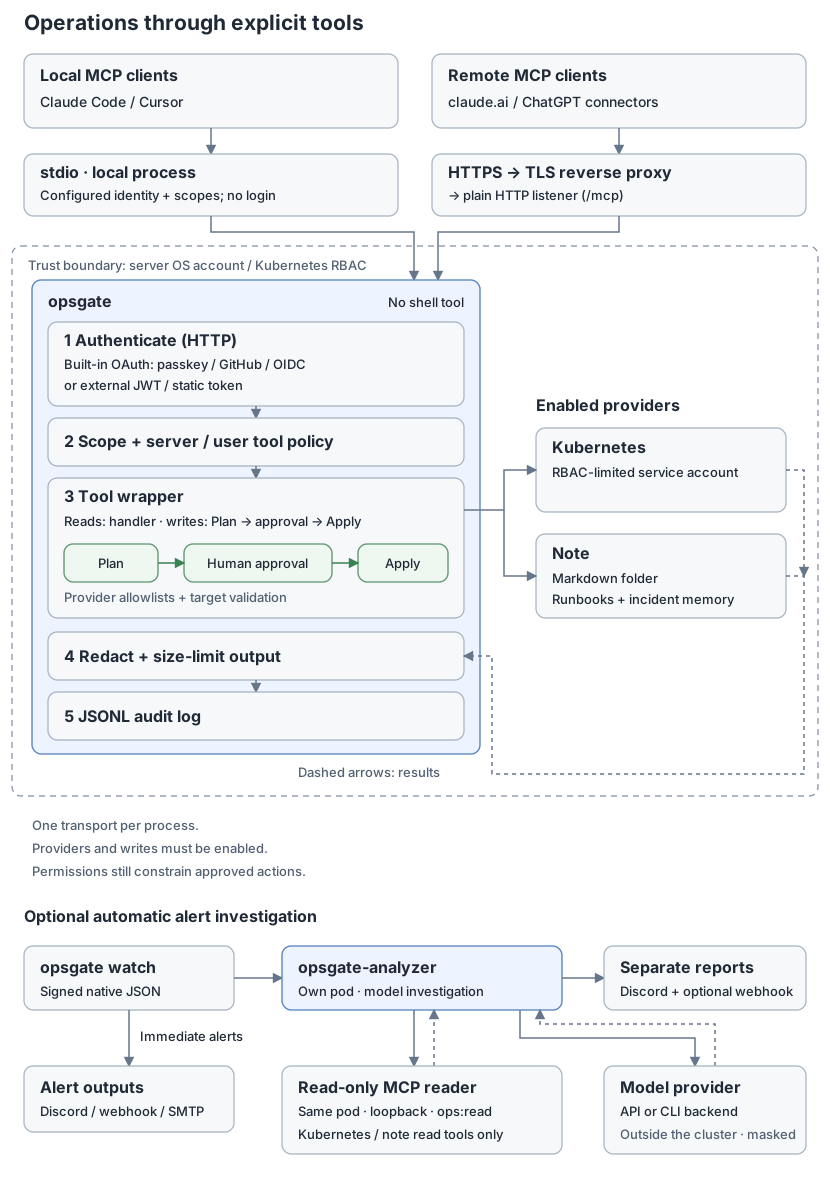
The AI client analyzes results and chooses the next operation. The opsgate MCP
server does not run or call an AI model; it checks and executes requested tools.
Only the optional, separate opsgate-analyzer calls a model you configure.
Kubernetes tools connect to the Kubernetes API using kubeconfig or in-cluster credentials. A local instance can therefore inspect a remote cluster when network access and permissions allow it.
Clients connect over local stdio (the client starts opsgate and communicates through standard input/output) or HTTPS through a TLS reverse proxy. opsgate checks identity and policy, plans and approves writes, then handles output and auditing. OS accounts and Kubernetes RBAC constrain access to the providers.
Details: architecture · approval · authentication.
How approval works
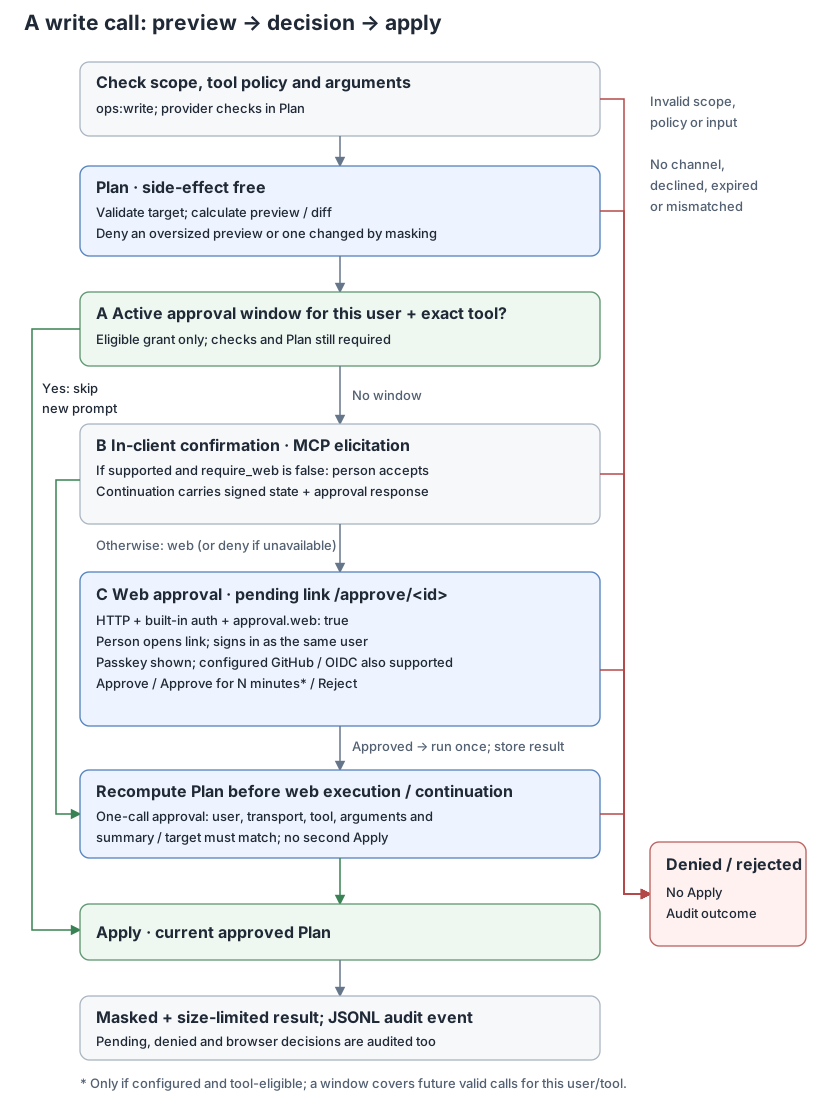
Write tools first prepare a plan showing the target and change. By default,
a person reviews and approves it on a web approval page when web approval is
available. Explicit approval.require_web: false opts in to in-client elicitation;
a compromised client can then approve its own writes. External/static auth and
stdio keep elicitation because they have no web channel. An omitted require_web
also allows elicitation with -transport stdio for mode-based files; explicit
true denies stdio writes. One-call approval binds the exact arguments and plan.
Approving in the browser rechecks the plan and runs the change immediately,
once. The MCP call waits up to approval.wait (default 25s with web approval,
maximum 55s) and returns the result if approval comes in time. Otherwise the
assistant reads it later with approval_status; repeating the call with
approval_id returns the stored outcome and never applies again.
Approve from anywhere
- Inbox.
/approvalslists your pending and recent approvals, alerts waiting for a decision and their results. Open it in a normal phone or desktop browser; messenger in-app browsers often break passkeys. - Push. With
approval.pushenabled, a change requested from a chat and, withwatch.inbox, a new alert send a Web Push to your devices. Tapping it opens the newest waiting approval directly. The push carries no content. On iPhone, add opsgate to the Home Screen first. - Undo. After scaling or restoring an image, the result offers an Undo link back to the previous state. It is a new action with its own plan and approval.
See approval inbox and notifications and undo.
Optional approval windows let a person approve a particular tool for a limited
time. During that window, subsequent calls by the same user can skip a new
approval prompt, including calls with different arguments on the approved target. Permission
and target checks still run on every call. Windows are disabled by default, and
k8s_restore_image never uses one.
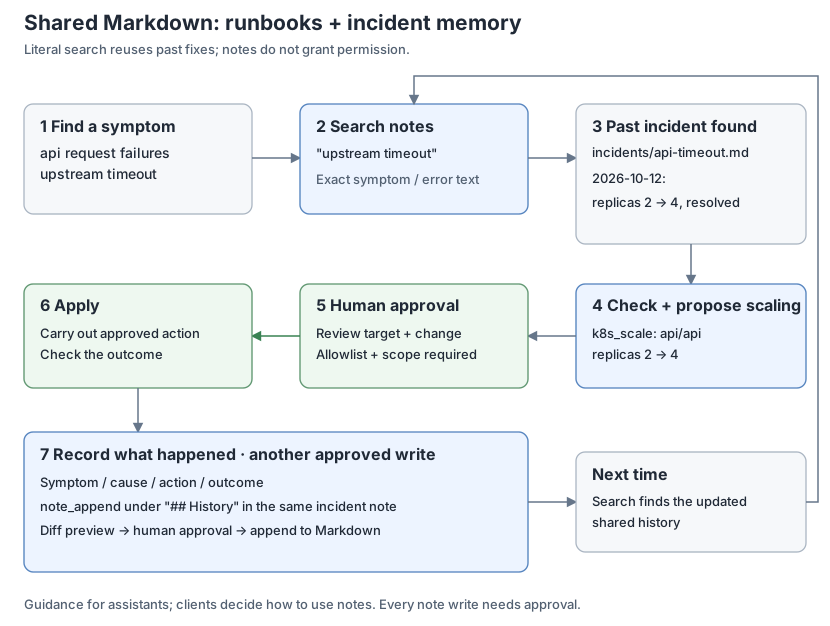
Notes: runbooks and memory
With the note provider enabled, assistants are instructed to search past incidents before acting and offer to record the outcome afterward. The AI client decides whether to follow this guidance; it is not an enforced workflow. Note changes require approval, and saved records can inform later investigations. See notes.
Quick start: local (stdio)
Download an archive from releases after verifying it, or build with Go 1.26 or later:
go install github.com/gkdis6/opsgate/cmd/opsgate@latest # or: make build
This go install builds only opsgate. The optional analyzer is the separate
command ./cmd/opsgate-analyzer.
Save a configuration using the current kubeconfig, for example /path/opsgate.yaml:
stdio:
  scopes: [ops:read]
providers:
  kubernetes:
    enabled: true
    namespaces: [default]
Register it with Claude Code (use absolute paths):
claude mcp add opsgate -- /path/to/opsgate -config /path/opsgate.yaml
Stdio runs with the permissions of the account that launches it. Run it unprivileged. Other clients: client setup.
Quick start: remote (HTTP with passkeys)
Passkeys need no identity provider: people sign in with Face ID, Touch ID, Windows Hello, a phone or a security key.
opsgate init asks for the public URL, who signs in and the namespaces, then writes
a short configuration:
opsgate init # writes opsgate.yaml; flags answer ahead, see -h
mode: kubernetes
http:
  public_url: "https://mcp.example.com"
auth:
  builtin:
    users:
      - subject: "passkey:alice"
        scopes: [ops:read]
    admins: ["passkey:alice"]
    allowed_redirect_hosts: [claude.ai, chatgpt.com, localhost]
    unknown_redirect_hosts: approve
providers:
  kubernetes:
    namespaces: ["*"]
    deny_namespaces: ["kube-system", "kube-public", "kube-node-lease", "opsgate"]
    allow_logs: true
The mode fills in the rest: HTTP on 0.0.0.0:8787,
builtin passkey sign-in, state in /var/lib/opsgate, browser approval links and
the pod’s ServiceAccount. opsgate config show -config opsgate.yaml prints every
effective value.
Put this file in the opsgate ConfigMap of deploy/kubernetes/opsgate-deployment.yaml and apply it. The manifest’s sample uses Google sign-in; passkeys do not need its optional opsgate-upstream Secret. Follow deployment for Secret provisioning, image verification, RBAC and probe configuration.
kubectl apply -f deploy/kubernetes/opsgate-deployment.yaml
- On first start, opsgate logs a one-time setup link (valid 24 hours) for each
user without a passkey. Open it and press Create passkey. Later links:
kubectl -n opsgate exec -it deploy/opsgate -- /opsgate passkey invite -config /etc/opsgate/opsgate.yaml -subject passkey:alice, which also draws a QR code to scan with your phone. - Put a TLS ingress or reverse proxy in front that preserves the
Hostheader. The public host must matchpublic_url; other hosts get 421. - Connect a client to
https://mcp.example.com/mcp, for exampleclaude mcp add --transport http opsgate https://mcp.example.com/mcp, or add it as a connector in claude.ai or ChatGPT.
The generated file already limits client redirect hosts
(allowed_redirect_hosts); review them before exposing the server. GitHub, Google and other sign-in options are covered
in authentication. Proxy routes and
release verification are in deployment. Run opsgate -h to list
commands and flags.
Quick start: recover from your phone
One opsgate init sets up the whole loop: an alert reaches your phone, you pick
an action, approve it with your passkey and see whether the service recovered.
Name the workloads you want to restart or roll back from your phone:
opsgate init -recover "apps/*" -language en
Besides opsgate.yaml it writes opsgate-watch.yaml for the watcher, grants
your user ops:write, lists those workloads for restart and image restore,
turns on Web Push and connects the watcher to your approval inbox with a signed
key. It then prints the remaining commands in order: RBAC for those namespaces,
one Secret for the key, the two manifests and your two configuration files, the
passkey link, and enabling notifications on your phone. Applying a manifest
again replaces its ConfigMap with the sample, so load your files after it.
Watch alerts
Run opsgate watch alongside the MCP server to receive Kubernetes problem and
change notifications. It watches the Kubernetes API and sends alerts directly
to Discord, custom JSON webhooks or SMTP email. n8n is optional.
- With
watch.approval_url, pod warnings carry a Choose an action link to the choices page. - With
watch.inbox, warnings also go to the approval inbox and push a notification to your phone (signed watch notices). - Namespace groups choose the outputs, warnings-only filtering and batch interval per group of namespaces; the first match wins.
Delivery configuration
Add the following to a configuration with the Kubernetes provider enabled:
watch:
  problems_only: true # optional: warnings only
  outputs:
    - name: discord
      type: discord
      language: ko # ko or en
      url_file: /etc/opsgate/discord-webhook-url
    - name: custom
      type: webhook
      url: https://alerts.example.com/ingest
      header_files:
        Authorization: /etc/opsgate/alerts-authorization
      body_template: |
        {"message": {{json .Text}}, "sent_at": {{json .SentAt}}, "alerts": {{json .Alerts}}}
Keep the destinations you need. Store the Discord channel's incoming webhook URL
in url_file; the authorization file contains the full header value, such as
Bearer TOKEN. Files are read at startup, so restart watch after changing them.
In Kubernetes, mount these files from Secrets.
opsgate watch -config opsgate.yaml
watch.problems_only: true keeps warnings such as restarts, OOMKilled, image
pull failures and stalled rollouts. It drops change notices for every destination:
images, replicas, ConfigMap keys, objects added or removed, and node recovery. Set
it on one output to limit only that destination. Individual reasons cannot be
filtered.
Each destination has its own queue, cooldown and retries. Discord embeds include
UTC occurrence times, cluster, namespace/resource, reason and summary; long
batches are visibly truncated to fit Discord's limit. Custom templates use the
json helper to escape values and must produce valid JSON. Configure destinations
through watch.outputs and watch.email. See watch alerts for delivery limits, HMAC signatures and all
configuration options.
Investigating an alert
Paste an alert into your MCP client with a request such as:
Investigate this alert using opsgate MCP. Check operational records, resource status and events, and current and previous container logs. Separate confirmed causes, hypotheses and checks that still need to be made.
The client's AI does the investigation with read tools. Available evidence depends on enabled providers and access policy, and deleted Pods or expired logs and events can prevent a conclusive diagnosis. Changes follow the usual approval process.
Automatic investigation (optional)
The separate, experimental opsgate-analyzer receives signed watch alerts, has a
model investigate through an allowlist of read-only MCP tools, and sends a report
to Discord. Alerts go out first; the report is a separate message, so analysis does
not delay them. It groups repeated alerts, enforces investigation limits, never
calls write tools and never executes its own proposals. Select an OpenAI-compatible
API or an installed Claude Code or Codex CLI with model.backend. Normal watch and
MCP use need no model.
Data leaves your cluster. Alert text and tool output, including logs and notes the analyzer can read, go to the model provider you select, and reports go to Discord and optionally a configured forward receiver. Alert string values are masked before JSON encoding for every model backend; reports are masked before either notification sink. Redaction cannot detect every secret. Allow access only to data you intend those services to receive.
Report language and action proposals are set with report.language and
report.suggest_actions. See automatic investigation.
Restoring a failed image (optional)
Set restore_image (a namespace/deployment allowlist) and action_approval_url
on a Kubernetes cluster to enable this. For a Pod failing with ImagePullBackOff,
ErrImagePull or InvalidImageName, k8s_remediation_options returns an approval
link when a non-deleting ReplicaSet of the same Deployment has a ready owned Pod
whose target container is ready and running the proposed image. Readiness does
not guarantee application health, and image tags can change in the registry.
The same rule also covers a crashing or stalled new rollout, the choices page
shows it, and the analyzer can attach it to its report.
Opening the link needs sign-in and shows a fresh plan. Nothing changes until a person approves, and the plan is checked again before the patch. Only that container's image changes; configuration is not rolled back. The result offers an Undo link back to the previous image.
How it compares
| If you want | Typical choice | What opsgate does differently |
|---|---|---|
| An AI client with broad Kubernetes access | General Kubernetes MCP servers such as kubernetes-mcp-server or mcp-server-kubernetes | Only a fixed catalog of reversible actions, each planned, approved with a passkey outside the AI client and checked again before it runs |
| Approval of AI-proposed changes | Approval-gated MCP servers such as Kubernetes MCP Guard | The same gate also serves alerts: a failing pod pushes a notification to your phone with choices for the current state, and the card reports whether the service recovered |
| Alerts with action buttons | Alerting tools that post actions to a chat, such as Robusta | Actions are approved with a passkey in any browser instead of a chat button, and the same server is an MCP server for root-cause analysis afterwards |
| Shell access from a phone | An SSH app | No commands to type: pick an action, read the plan, approve |
opsgate fits one person or a small team running their own cluster or server. It is not a replacement for team on-call tools, dashboards or general automation.
Frequently asked questions
Can I let Claude or ChatGPT restart my Kubernetes deployment safely?
Yes, within limits you set. Connect opsgate as a connector or MCP server, list
the workloads in rollout_restart, and every restart the AI requests becomes an
approval card that runs only after you approve it with your passkey.
Can the AI approve its own change? Not by default. With builtin sign-in, approval happens on a web page after a passkey (or GitHub/OIDC) sign-in, never inside the AI client. The server recomputes the plan before it runs and refuses if it no longer matches what you approved.
Does opsgate give the AI a shell, kubectl or Secrets? No. There is no shell tool, no arbitrary kubectl and no Kubernetes Secrets tool. Results are redacted and size-limited, and every call is audited.
How do I approve from my phone?
Open /approvals on your phone, enable notifications (on iPhone, add it to the
Home Screen first), and tap a notification when it arrives.
opsgate init -recover sets this up; see the
phone recovery quick start.
What happens if the fix does not work?
After the action runs, opsgate watches the workload and reports Recovered or
Not recovered yet, with the reason, such as CrashLoopBackOff. Image restores
and scaling offer an Undo button.
Do I need Kubernetes? Kubernetes is the main target. An optional host provider covers systemd units and Docker containers on a single server; see host provider.
Which AI clients work? Any MCP client: claude.ai and ChatGPT connectors over HTTP with OAuth, and Claude Code, Cursor or other clients over HTTP or stdio.
What does it cost? Nothing. opsgate is Apache-2.0 licensed and runs on your own infrastructure.
Security model in brief
- One instance is one trust group:
ops:readcovers every enabled provider. Use separate instances and OS accounts for things with different trust levels, such as production operations and personal notes. - Permission checks stack: scopes, server tool policy, per-user tool lists, provider allowlists, then OS permissions and Kubernetes RBAC.
- HTTP requires browser approval by default when
approval.webis enabled. Explicitapproval.require_web: falseopts in to elicitation, allowing a compromised client to approve its own writes; HTTP startup logs a warning. - The optional analyzer sends alerts and the evidence it reads to the model provider you select. Redaction reduces this exposure but does not guarantee it.
Full details: SECURITY.md.
Documentation
| Document | Contents |
|---|---|
| Architecture | Request flow, packages, design principles |
| Authentication | Passkey, GitHub, OIDC, external JWT, static tokens, stdio |
| Approval | Plan/apply, approval channels and windows, action links, choices per failure, inbox and push, undo |
| Client setup | Claude Code, Claude Desktop, claude.ai, ChatGPT, Cursor |
| Configuration | Every configuration key, defaults and audit log format |
| Tools | Tool arguments, limits, redaction |
| Notes | Runbooks and incident memory in a Markdown folder |
| Host provider | systemd units and Docker/Compose containers without Kubernetes; polkit and socket proxy setup |
| Deployment | Release verification, Kubernetes, reverse proxy |
| Watch alerts | Kubernetes alerts to Discord, custom JSON webhooks, email and the approval inbox through a separate opsgate watch process; namespace groups |
| Automatic investigation | Optional model worker, read-only MCP authentication and investigation limits |
| Roadmap | What is done and what may come |
Contributing and license
See CONTRIBUTING.md, the Code of Conduct and changelog. Licensed under Apache-2.0, copyright 2026 The opsgate Authors.