Architecture
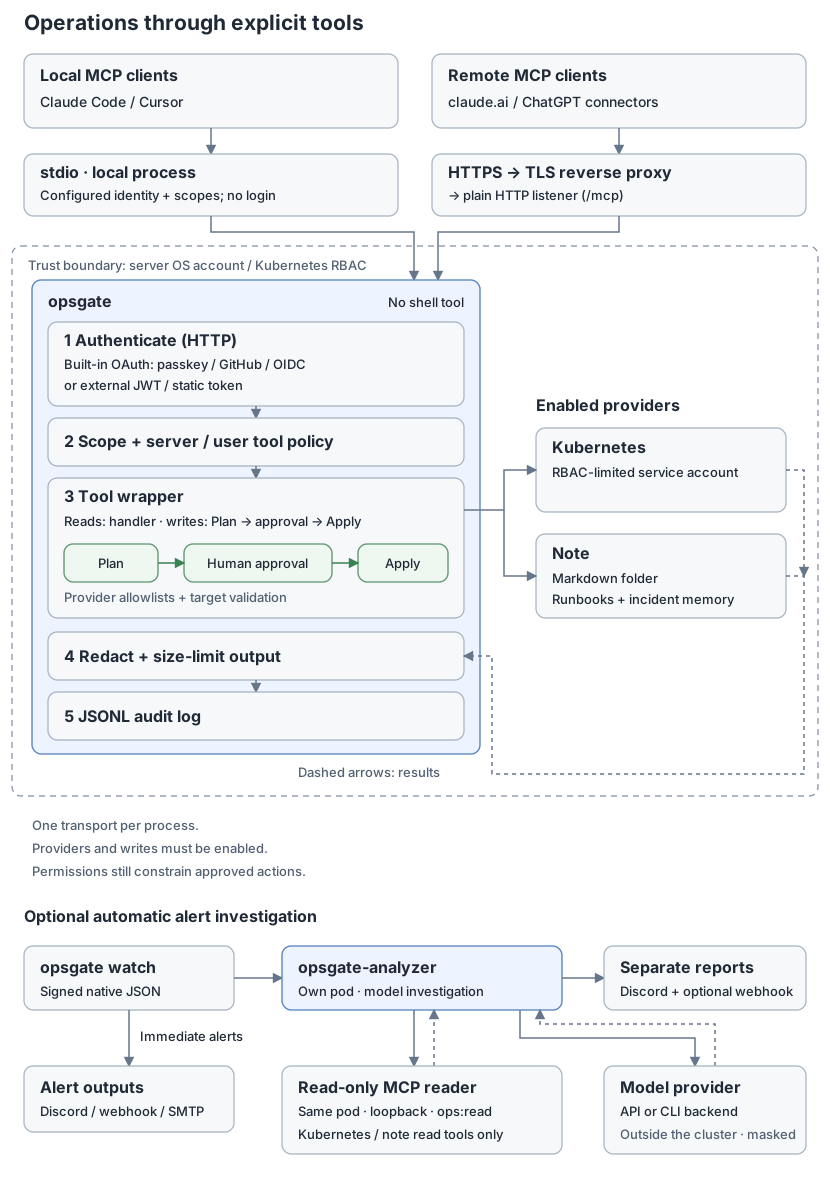
opsgate is a Go MCP server. It exposes configured operations through providers and applies shared authorization, output handling and auditing around their tools.
Request flow
AI client (claude.ai, ChatGPT, Claude Code, or another MCP client)
  |
  +-- HTTPS -> reverse proxy -> HTTP listener
  |     common security headers, panic recovery, access logging
  |     -> Host check (421 on mismatch) -> endpoint-specific CORS -> routing
  |          /mcp -> Bearer verification -> ops:read -> protocol handler
  |          /.well-known/* -> discovery metadata
  |          /oauth/*, /passkey/*, /admin/clients -> built-in OAuth
  |          /approve/* -> web approval manager
  |          /healthz -> health response
  |
  +-- stdio -> configured local identity and scopes
                  |
                  v
             Go MCP SDK server: tools/list, tools/call
                  |
             shared tool wrapper
                  |
                  +----------+
                  |          |
                 kube       note
The HTTP listener serves plain HTTP; use a reverse proxy for public HTTPS. http.public_url must be an HTTPS origin, except for loopback HTTP. The Host check accepts the configured public authority, or a loopback host when the listener and local connection address are loopback. CORS applies only to discovery and selected MCP/OAuth endpoints, not to browser decision pages.
For /mcp, Mcp-Protocol-Version values lexically at or above 2026-07-28 select the stateless handler. Earlier or absent values select the session handler, whose session timeout is 30 minutes. This supports newer sessionless clients, including ChatGPT, while keeping sessions for older clients and elicitation. This routing decision does not grant access.
The command selects one transport per process. stdio is the default. HTTP requires an explicit authentication mode and ops:read for all callers.
Automatic alert investigation
opsgate-analyzer is an optional, experimental separate process. opsgate watch sends HMAC-signed native JSON batches to its /alerts endpoint through an independent webhook output; immediate notifications do not wait for the model. The analyzer uses a model and read-only MCP tools for bounded investigations, then sends a result or failure report to Discord and an optional signed webhook. The reference manifest runs the analyzer and a loopback MCP reader container together in their own pod, with zero replicas until configuration and credentials are supplied. See Automatic alert investigation.
Packages
| Package | Responsibility |
|---|---|
cmd/opsgate |
Loads configuration and assembles the process; supports init, config show, -gen-token, passkey invite and watch |
cmd/opsgate-analyzer |
Loads analyzer configuration and starts the opsgate-analyzer receiver and investigation worker; -check checks configuration and credentials |
internal/analyzer |
Signed batch reception, queueing, model adapters, bounded read-only MCP investigations and report delivery |
internal/alert |
Watch alert batching, deduplication and webhook, Discord and SMTP delivery |
internal/buildinfo |
Executable version from build-time injection or Go build metadata |
internal/config |
Loads one YAML document over defaults, rejects unknown keys, validates configuration and defines scopes |
internal/httpserver |
HTTP routing, Host/CORS checks, security headers, access logs and protocol selection |
internal/authn |
Static bearer verification and external JWT verification through discovered JWKS |
internal/oauth |
Built-in OAuth authorization server: client registration (DCR), S256 PKCE, consent screens, token rotation/revocation, passkeys and administrator client review |
internal/server |
Creates the MCP server and registers enabled providers |
internal/tool |
Registration policy, caller/tool scopes, argument limits, timeouts, write planning/approval, output masking and truncation, audit events |
internal/approval |
In-client elicitation, web approval links and optional approval windows |
internal/redact |
Masks known secret patterns using regular expressions and direct scanning; masking is a safety net, not complete secret detection |
internal/audit |
Appends JSONL audit events to a file or stderr |
internal/ui |
Shared page layout for consent, approval, passkeys and administration |
internal/provider/kube |
Kubernetes objects, events and logs; allowlisted rollout restarts, scaling, pod deletion and image restoration within namespace policy; read-only remediation options |
internal/provider/note |
Searches and reads a Markdown vault; optional create/append/replace/trash tools with content/diff previews and snapshot checks |
Tool execution
Server tool policy is applied during registration. Denied tools do not appear in tools/list. Empty server.tools.allow permits all offered tools, and deny patterns win. A server policy pattern matching no offered tool causes startup to fail. A caller's optional tools globs further restrict calls; they do not filter the shared tool inventory.
Read/general tool:
  argument size -> caller -> user tool policy -> required scope
  -> timed handler -> output handling -> audit -> MCP result

Approved write tool (AddWrite):
  parse/size/hash arguments -> caller -> user tool policy -> required scope
  -> timed Plan -> validate preview -> confirmation -> timed Apply
  -> output handling -> audit -> MCP result
Most tools require ops:read; approved writes normally require ops:write.
The default argument limit is 16 KiB. Content-bearing writes can use larger per-tool limits. The default timeout is 30 seconds and uses context cancellation; writes receive separate Plan and Apply deadlines. Confirmation sits between those deadlines. See Tools for individual limits.
Tool output and error text over 4 MiB are replaced with an omission message. Otherwise, known secrets are masked before truncation to server.max_output_bytes (64 KiB by default). Audit events record identity, transport, tool, masked arguments, outcome, duration and output size; approved writes also record the plan and confirmation method. Full successful output is not stored in the audit event. An empty server.audit_log sends JSONL events to stderr, alongside process logs.
Permission boundaries
Access is constrained by several independent layers: token/local scopes, server tool policy, caller tool restrictions, provider allowlists, and finally OS permissions or Kubernetes RBAC. Provider checks happen inside handlers or plans; approval does not replace them.
Approved writes follow Plan → confirmation → Apply. A one-call confirmation binds the user, transport, tool, unredacted argument hash and plan summary. An optional approval window deliberately grants broader access for one user, tool and target. See Human approval.
Treat logs, notes, events and agent output as untrusted data. Masking reduces accidental exposure; it does not prevent prompt injection or make that text safe to follow as instructions.
The analyzer calls only k8s_clusters, k8s_overview, k8s_list, k8s_get, k8s_events, k8s_logs, k8s_service_check, k8s_remediation_options, note_search, note_read, note_recent, note_list, note_links, note_tags, and also requires readOnlyHint. Policy is checked again before execution; approval windows cannot expand this list. A dedicated reader’s ops:read token, tool policies, namespace policies and read-only RBAC further constrain access.
The analyzer has the shared HMAC key, MCP bearer token, Discord webhook URL, and either a model API key for the API backend or the execution account’s CLI login credentials for CLI backends. Optional report forwarding uses a separate HMAC key. The reference pod’s ServiceAccount is bound to opsgate-readonly. Its /alerts Service has no public ingress; restrict network access to watch. It needs loopback access to the reader and outbound access to the selected model provider, Discord and any configured forwarding receiver. The reference manifest defines no NetworkPolicy. Alert text and tool output are masked before sending to the model, and reports before Discord, but masking cannot guarantee detection of all sensitive content: allow only data intended for the selected model provider and Discord to receive. See Automatic alert investigation.
Minimal local configuration
All providers are disabled by default. Enabling a provider is separate from enabling writes or granting write scopes. Some policies are permissive when empty, notably server tool allow policy; “everything is off” describes provider defaults, not every setting.
stdio:
  user: alice
  scopes: [ops:read]
providers:
  kubernetes:
    enabled: true
    namespaces: [default]
Save as opsgate.yaml, then run:
opsgate -config opsgate.yaml -transport stdio
See Configuration, Authentication and Deployment for the corresponding operator settings.